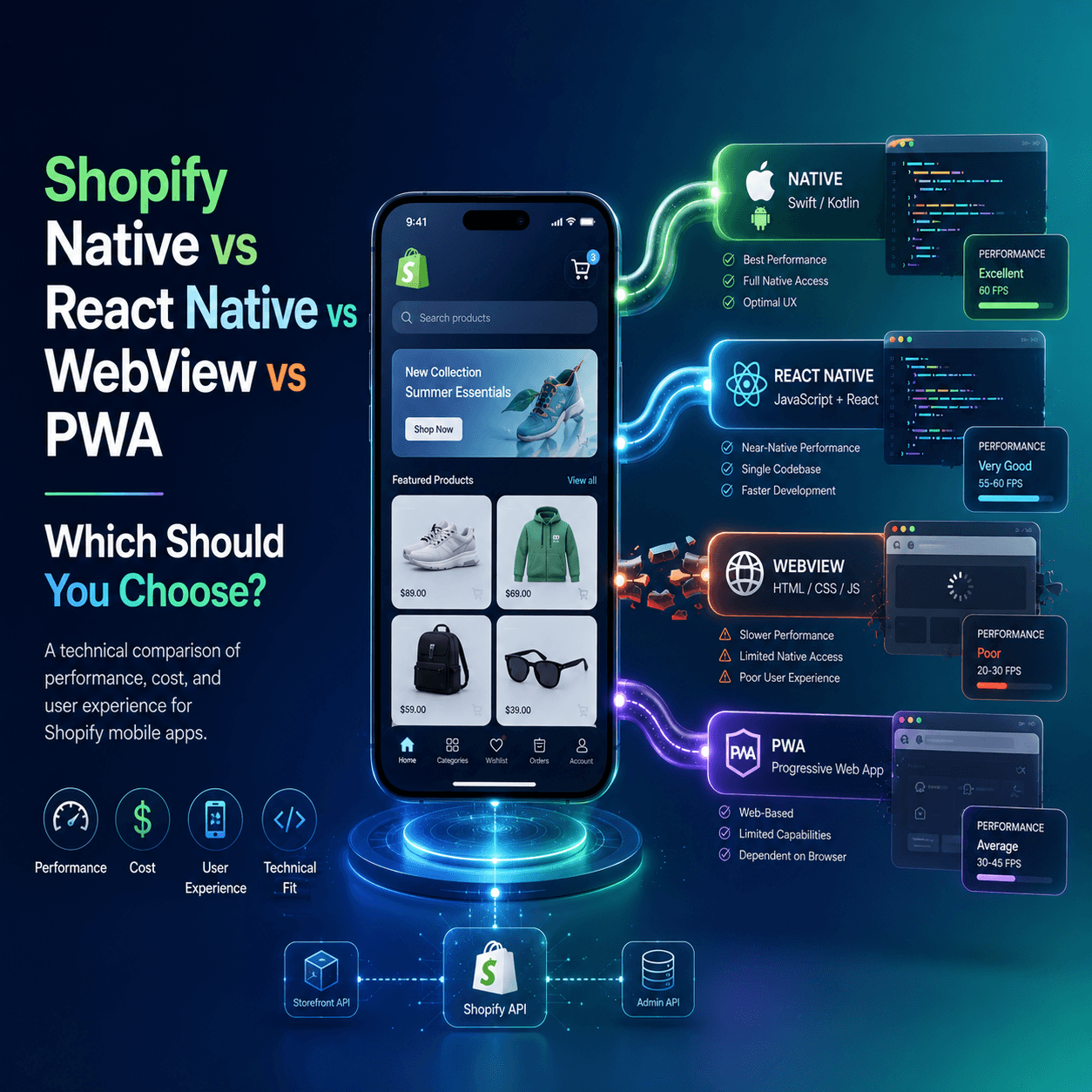
Understanding Your Options
When building a mobile app for your Shopify store, you have four fundamental technical approaches. Each has distinct trade-offs in performance, cost, development time, and user experience. Understanding these differences helps you make the right choice for your store.
Option 1: Fully Native Apps (Swift/Kotlin)
Fully native apps are built using the platform-specific programming languages — Swift for iOS and Kotlin for Android. Each platform gets its own separate codebase.
How It Works
Two separate development teams (or one team with both skill sets) build two independent applications that connect to your Shopify store through the Storefront API or Admin API. Each app is written in the native language for its platform and uses native UI components.
Performance
Native apps deliver the absolute best performance possible on each platform:
- Load times: Under 200 milliseconds for screen transitions
- Animations: 60 frames per second consistently, matching system apps
- Memory usage: Optimized for each platform's memory management
- Battery efficiency: Best possible since native code runs most efficiently
Advantages
- Maximum performance and smoothest possible user experience
- Full access to every device feature and API (camera, AR, NFC, Bluetooth)
- Best possible App Store review compliance
- Identical look and feel to other apps on each platform
Disadvantages
- Cost: 60,000 to 200,000 dollars minimum for both platforms
- Timeline: 4 to 12 months of development
- Maintenance: Two separate codebases require double the maintenance effort and cost
- Developer scarcity: Finding developers skilled in both Swift and Kotlin plus Shopify API integration is difficult and expensive
- Update speed: Every change must be implemented twice — once for each platform
Best For
Enterprise Shopify Plus stores with custom requirements, large development budgets, and in-house mobile development teams.
Option 2: React Native Apps
React Native uses JavaScript and React to build mobile apps that compile to native components on both iOS and Android from a single codebase.
How It Works
A single codebase written in JavaScript and React produces apps for both platforms. React Native components map to native UI elements — a React Native button becomes a real iOS UIButton or Android Button, not a web element styled to look like one.
Performance
React Native delivers near-native performance:
- Load times: 200 to 500 milliseconds for screen transitions
- Animations: 55 to 60 frames per second for most interactions
- Memory usage: Slightly higher than fully native but well within acceptable ranges
- Battery efficiency: Very good — comparable to native in most use cases
For ecommerce apps, the performance difference between React Native and fully native is imperceptible to users. The millisecond-level differences only matter for graphics-intensive applications like games.
Advantages
- Single codebase — One team builds for both platforms simultaneously
- Near-native performance — Indistinguishable from fully native for ecommerce use cases
- Faster development — 30 to 50 percent faster than building two native apps
- Lower cost — One codebase means roughly half the development and maintenance cost of fully native
- Large ecosystem — Extensive library ecosystem and large developer community
- Hot reloading — Faster development and testing cycles
Disadvantages
- Slightly less performant than fully native for complex animations (not noticeable in ecommerce)
- Occasional platform-specific bugs that require native debugging knowledge
- Dependency on the React Native framework for platform update compatibility
Best For
Most ecommerce stores. React Native offers the optimal balance of performance, cost, and development speed for Shopify apps.
BrewmyApp builds React Native apps — giving you native-quality performance without the cost and complexity of fully native development.
Option 3: WebView Apps (Hybrid)
WebView apps wrap your existing mobile website inside a native app shell. The app is essentially a browser window displaying your Shopify store's responsive website.
How It Works
A thin native app container loads your Shopify store's URL in a WebView component. The content you see in the app is your website rendered inside the app. Some WebView builders add native elements like a tab bar or push notification support around the WebView content.
Performance
WebView apps have notably worse performance:
- Load times: 1 to 5 seconds per page — the same as visiting the website in a browser
- Animations: Janky, inconsistent frame rates limited by web rendering
- Memory usage: Higher than native due to running a full browser engine
- Battery efficiency: Poor — rendering web content continuously drains battery faster
Advantages
- Low cost: 20 to 100 dollars per month for basic builders
- Fast setup: Can be live in days since it is essentially wrapping your existing website
- Automatic content updates: Changes to your website immediately appear in the app
- No app-specific development: Your website is the app
Disadvantages
- Poor performance — Users can feel that the app is just a website wrapper
- High App Store rejection risk — Apple specifically rejects apps that are "simple web clipping" of a website. Their guidelines require apps to provide value beyond what a mobile website offers
- No offline capability — Without internet, the app shows nothing
- Limited native features — Cannot properly access camera, biometrics, or other device features
- Poor user experience — Loading spinners, page refreshes, and web-style navigation feel wrong inside an app
- No competitive advantage — The app provides the same experience as visiting your website
Apple App Store Policy Warning
Apple's App Store Review Guidelines section 4.2 specifically addresses this: "Your app should include features, content, and UI that elevate it beyond a repackaged website." WebView apps are frequently rejected, wasting your time and app store fees.
Best For
Not recommended for serious ecommerce businesses. If cost is the absolute primary concern and you accept the limitations, a WebView app is technically possible — but the poor experience may damage your brand.
Option 4: Progressive Web Apps (PWAs)
PWAs are enhanced websites that can be "installed" on a device's home screen from the browser. They use modern web technologies to provide some app-like features.
How It Works
Your Shopify website is enhanced with a service worker (for offline caching), a web app manifest (for home screen installation), and potentially push notification support (limited on iOS). Users visit your website and are prompted to "Add to Home Screen."
Performance
PWAs perform similarly to mobile websites with some improvements:
- Initial load: Similar to website — 1 to 5 seconds
- Subsequent loads: Faster due to service worker caching — 0.5 to 2 seconds
- Animations: Web-quality — noticeably inferior to native
- Offline: Basic cached content available, but no transactional features offline
Advantages
- Zero cost to build — Uses your existing Shopify theme with some enhancements
- No app store required — No Apple or Google review process
- Instant updates — Changes deploy immediately like a website
- SEO benefits — PWA content is indexed by Google like any website
- No download required — Users can start using it instantly from the browser
Disadvantages
- Severely limited on iOS — Apple restricts PWA capabilities significantly:
- Push notifications for PWAs on iOS only work on iOS 16.4+ and have significant limitations
- No badge count on the app icon
- Limited background processing
- Storage can be cleared by the OS after inactivity
- No App Store presence — Users cannot discover your PWA in the App Store or Google Play. You miss the discoverability and credibility that app store listings provide.
- Limited push notifications — Web push has much lower opt-in rates and engagement than native push
- No native features — No Apple Pay, no biometric login, no camera access
- Lower engagement — PWA engagement rates are significantly lower than native apps because there is no persistent install or icon prominence
Best For
Budget-conscious stores that want to test mobile engagement before investing in a native app. A PWA is a good intermediate step but should not be considered a replacement for a native app for stores serious about mobile commerce.
Connecting your store to BrewmyApp
Three ways to connect your store
You do not create an account first. Every route below signs you up and connects the store in the same step.
- From the BrewmyApp homepage. Paste your store URL into the box at the top of brewmyapp.io, approve the install, and you land in the designer with your products already synced.
- From the Shopify App Store. Install BrewmyApp directly from Shopify. The install itself creates your account and links the store — nothing to fill in afterwards.
- From the dashboard. Already have a store connected and want to add another? Add it from your stores page.
Whichever you pick, products, collections, variants, and inventory sync automatically. There is no CSV export and no API key to paste.
BrewmyApp is $49/month or $499/year per store. Designing your app and previewing it on a real device is free — you pay when you build and publish. The app stores charge separately: Apple's Developer Program is $99/year and Google Play is a one-time $25 fee.
Comparison Summary
| Factor | Native | React Native | WebView | PWA |
|---|---|---|---|---|
| Performance | Excellent | Very Good | Poor | Average |
| Development Cost | Very High | Moderate | Low | Very Low |
| Time to Launch | 4 to 12 months | 1 to 4 weeks | Days | Days |
| App Store Approval | Excellent | Excellent | Risky | N/A |
| Push Notifications | Full | Full | Limited | Very Limited |
| Offline Support | Full | Full | None | Partial |
| Native Features | All | Most | Few | Very Few |
| Maintenance Cost | High | Moderate | Low | Very Low |
| User Experience | Best | Near-Best | Poor | Average |
Our Recommendation
For Shopify store owners, React Native is the clear winner for the vast majority of use cases. It delivers native-quality performance at a fraction of the cost and development time of fully native apps, while providing all the features that matter for ecommerce — push notifications, fast checkout, offline support, and native payment integrations.
WebView apps should be avoided entirely if you care about user experience and App Store approval. PWAs are acceptable as a temporary solution but lack the engagement and conversion capabilities of native apps.
BrewmyApp builds React Native apps for your Shopify store with no coding required. Start for free and see the difference in quality firsthand.
Related reads:
Ready to Turn Your Store into a Mobile App?
Design and preview your app for free. No coding required.
Start Building for Free